Quest design: always give the player a next objective
How Mytheria's journal works: one objective on screen at a time, steps that complete from what you already did, search rings instead of exact pins.
On this page
Players leave an open world that gives them nothing to aim at. They don't want to be told what to do every second, but whenever they stop and wonder, they want to know what a sensible next thing would be. In Mytheria, our pixel-art co-op game, that's the journal: one line at the top of the screen with the next objective, and a book with the whole journey when you want more.
The clips and stills below were filmed in the game for this post.
How do you design quests that keep players moving?
Always have one clear next objective, and keep it on screen in a single short line. Write objectives as actions the player can picture, like "Fell a tree for wood" instead of "Gather resources". Let them complete from whatever the player actually does, in any order, so nothing has to be repeated. Point roughly to where to go without giving away the exact spot, and keep the long-term goal one press away.
The short answer
How Mytheria's journal works:
- One line on the HUD shows the next objective and its progress, like 2/3.
- A book on the J key shows every chapter, with what's done and what's next.
- There are six chapters and 43 steps: a guided first morning, then one chapter per region and the ending.
- Steps complete from what you already did, in any order, and wait until the thread reaches them.
- For places you should discover, the map shows a search ring that says "somewhere here" instead of an exact pin.
- In co-op there's one journal per world, so everyone follows the same thread.
One line, always
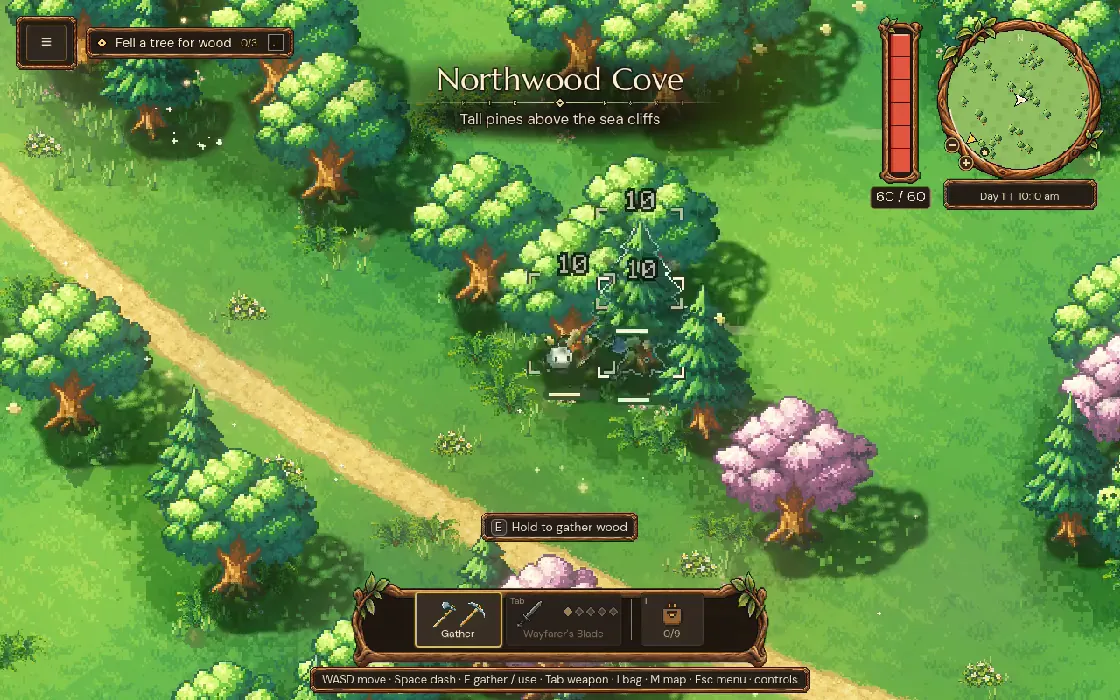
The objective lives in a single line under the menu button: a diamond, the step, its progress and a key hint. When you finish a step, it ticks and fades, and the next one settles in:
The HUD shows nothing else about the quest, so the world stays uncovered. The line also waits its turn: when a place's name is being shown on screen, the two take turns instead of overlapping. More on the rest of the HUD in our compass and clock HUD. And if you don't want it, Accessibility has an Objective tracker switch.
Start guided, then let go
The first chapter, the First Morning, is guided: eight short steps in order, from felling a tree to improving your gear at the anvil. Each one teaches a piece of the game by using it. The thread stays in that chapter until all eight are done.
After that, the journal relaxes. Each region gets a chapter with a few big goals, such as finding its temple, laying its keeper to rest and restoring its settlement. When you open a new region, the thread moves on to it, and any steps you skipped stay in the book as "still open". You're never forced to finish a region before moving on.
Let steps complete from what you already did
Every step is a check on the state of the world. "Fell a tree for wood" checks that you hold three wood, and "Build the anvil" checks that the anvil stands. So if you build the anvil before the journal asks, that step is already done, and when the thread gets there it skips straight past, so nothing has to be done twice.
Try it with the game's real journal. Tick steps off in any order and watch the objective at the top:
Tick steps off in any order and watch the objective at the top
Point to "somewhere here"
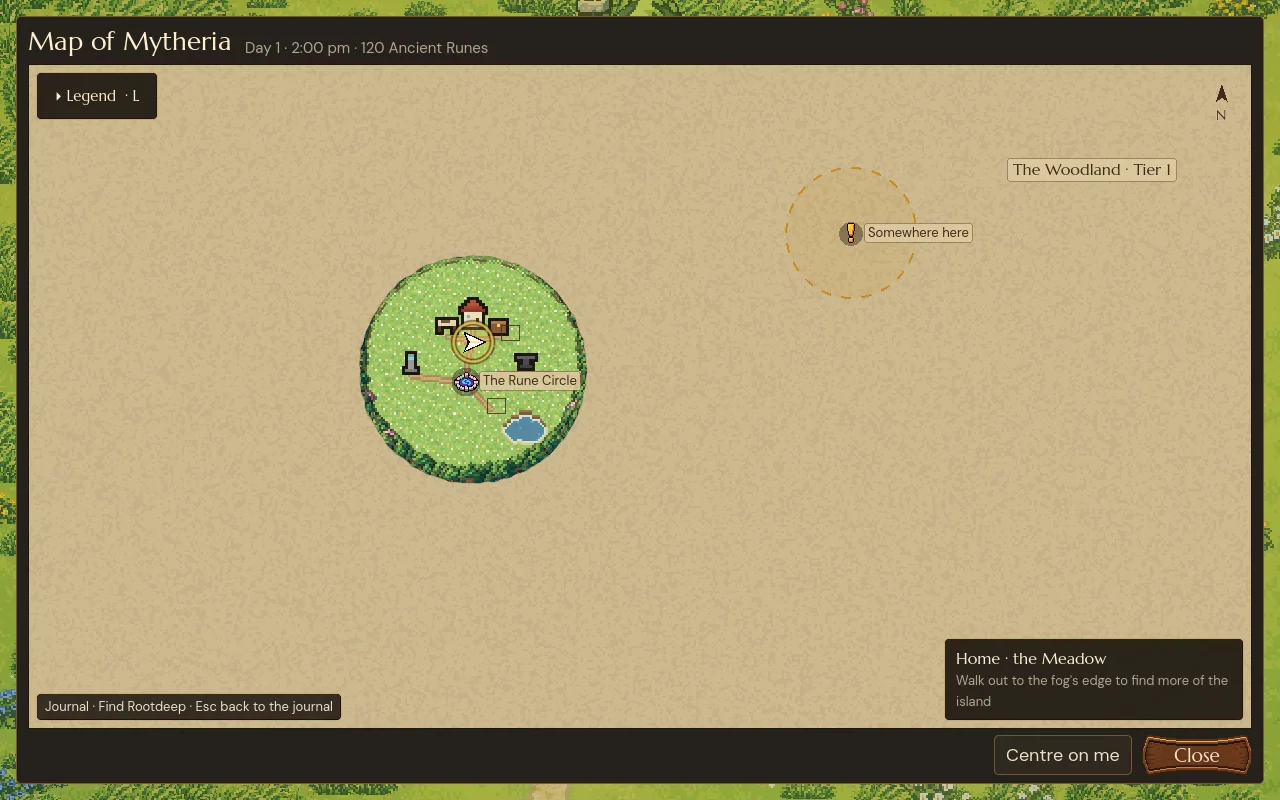
Most steps have a hint on the map. For something at home, like the stash, it's an exact pin. For something you should discover, like a mine or a temple, it's a search ring: a gold circle with a radius of 520 units, with its centre deliberately away from the target. You know which part of the map to explore, and you still have to find the place.
Keep the long goal in a book
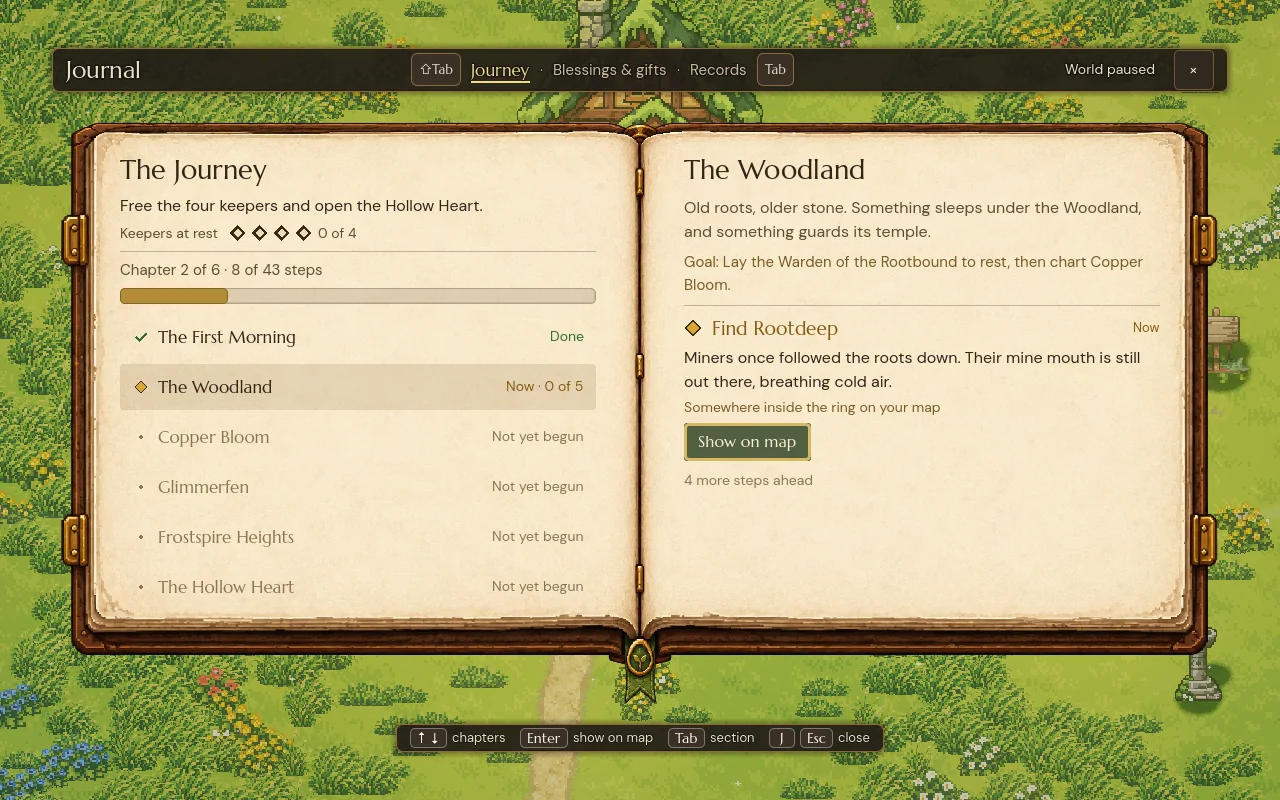
The HUD line is short-term. The journal book, on J, shows the long view: the journey's overall goal, how many keepers are at rest, every chapter with its progress, and the current step with a line of story and a button to show it on the map. The rest of the story lives out in the world; see how to tell a story without cutscenes.
Share it in co-op
Each world has one journal, shared by every player. Everyone playing together sees the same objective, and a step completed by anyone is done for everyone. The host's game decides when a step is done, and the first time a world opens, the journal records everything that's already true, so loading a save never floods you with old completions. How the journal fits the larger rhythm of the game is in game loop design.
A checklist for quest design
- Always show one next objective, in one short line.
- Write objectives as concrete actions.
- Guide the first chapter closely, then let go.
- Complete steps from the world's state, in any order.
- Let the thread move on to new areas, keeping leftovers in the book.
- Use search rings for places to discover and pins for places to return to.
- Keep the long goal one press away.
- In co-op, share one journal.
Further reading
- Game loop design: gather by day, survive the nightMytheria's core gameplay loop as a real example: a daily loop of gathering and night danger inside a region loop of settlements, upgrades and bosses.
- Game HUD design: a compass and a clock in oneHow the HUD in Mytheria puts map, time and day in one corner: a clock that fills around the compass, and a readout that shifts colour with the hour.
- MytheriaFollow the thread yourself: a pixel-art co-op adventure for one to four players.
Wishlist Mytheria
Mytheria is a pixel-art co-op adventure for one to four players, coming to Steam for Windows, macOS and Steam Deck. A wishlist is the best way to follow it and to help us.