How to make a pixel art forest feel alive
How Mytheria's pixel art forest moves: one wind for the whole world, a different stiffness per plant, whole-pixel sway, grass that parts and wildlife.
On this page
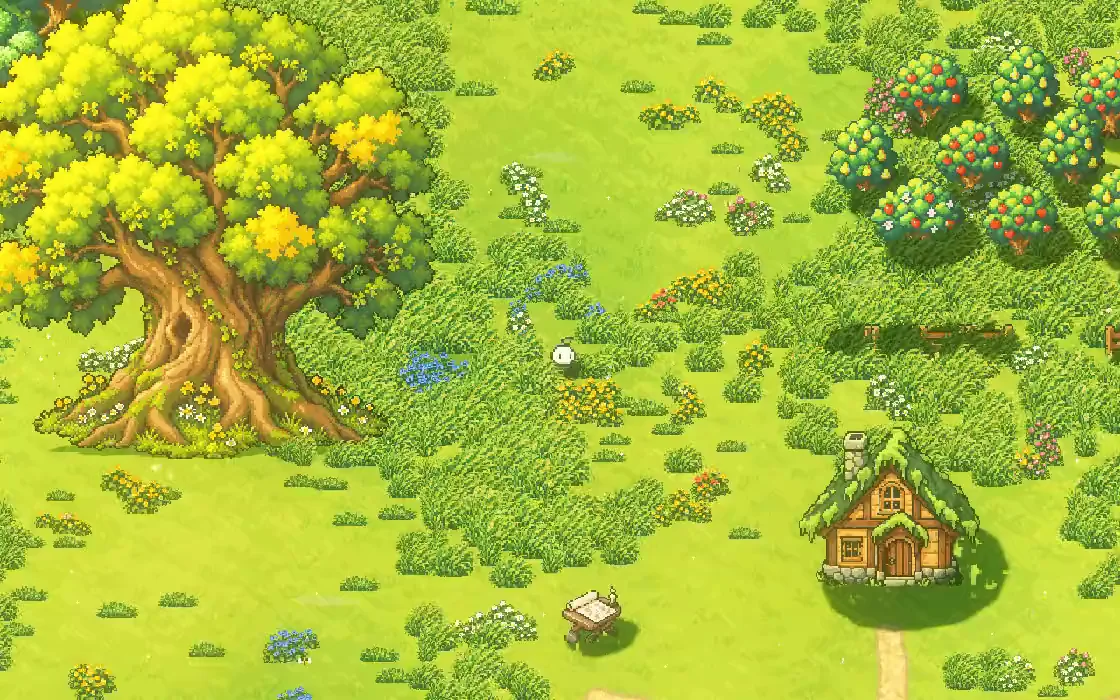
A pixel-art forest can be beautifully drawn and well placed and still feel like a painting you walk across. It starts to feel alive with small, constant motion that follows a few rules: the wind travels across the land, each kind of plant answers it in its own way, and plants react when you pass. This is how we do it in Mytheria, our pixel-art co-op game.
Every clip below is from the game, filmed for this post.
What makes a pixel art forest feel alive?
Motion with a visible cause makes it feel alive. Trees, grass and flowers sway in the same wind but not in step, and the wind arrives in gusts you can see travel. Plants move aside when you walk through them, and a few small creatures go about their business. All of it stays quiet enough that you notice the world before you notice the effects.
The short answer
How the forest moves in Mytheria:
- One wind blows across the whole world. A gust front travels across the island, so neighbouring plants move together and distant ones don't.
- Each kind of plant has its own stiffness: grass and reeds bend most, broadleaf trees less, and pines least.
- Every plant gets its own timing, so no two move in step.
- Plants sway by shifting whole rows of pixels, never by bending the art smoothly.
- Roots stay put, and only crowns and tops move.
- Grass parts as you walk through it, and trees shake when you chop them.
- A little wildlife lives where it makes sense, like butterflies at flowers and fireflies at crystals.
One wind, many plants
Try it with real plants from the game, moved by the game's own wind:
Change the wind, then try the two mistakes
The wind is a single wave that travels across the world. At any moment some of the island is in a gust and some is between gusts, and the gust moves on. Every plant reads the wind where it stands, so you can watch a gust roll through a stand of trees, one after another, instead of the whole forest moving at once.
On top of that, each kind of plant has its own stiffness. Our values, as the share of the wind each one takes: grass 0.19, reeds 0.22, broadleaf trees 0.10, and pines just 0.047. A pine next to an oak barely moves while the oak's crown sways, as you'd expect from real trees.
Don't let everything move in step
Turn on All in step in the figure. When every plant gets the same timing, the forest looks like one machine. In the game, every plant gets its own phase, worked out from its id, so it is always the same for that plant but different from its neighbours. A field of grass then ripples instead of moving as one block.
Move whole pixels, never fractions
Turn on Smooth bending in the figure. The plants shimmer, and the pixel grid falls apart, with pixels landing half on one column and half on the next. Pixel art only looks crisp when every pixel lands on the grid, so our plants move by shifting whole rows of pixels left or right. Grass shifts more the higher the row, so its tips move most. A tree's crown moves as one block, and only the few rows just above the trunk bend, so the leaves never crawl through each other. Trunks and roots never move.
Let the world react to the player
The forest also reacts to the player. In the tall grass of the meadow, the grass parts around you as you walk through it and closes again behind you, around every player in co-op. Tussocks come up to the player's knees, never higher, so you never lose sight of yourself.
Trees react to you as well: a tree you chop shakes for a short moment, 0.17 seconds, with a little squash and stretch, before it settles back into the wind. Dead wood, like the bare snags in the Hollow Heart, doesn't sway at all, which makes those places feel still and wrong, as they should.
Put wildlife where it belongs
A few small creatures do more for a forest than any amount of extra plants, as long as they have a reason to be where they are. Butterflies visit flowers, so there are more of them over the meadow's flower drifts than in the forest, and bees work the sunflower heads. Dragonflies hover over reeds and lily pads in the marsh, then dart to the next spot. At night, fireflies gather around the glowing crystals. Leaves, petals and pale wisps drift by now and then, never in a stream.
Most of these have a small limit, for example 12 drifting leaves or 8 petals at a time, so the world feels inhabited without getting busy. We wrote more about holding effects back in pixel art lighting.
How we made the forest move in Godot
In our Godot code the wind is a single formula of position and time, so any plant on any frame can ask how strong the wind is where it stands, and nothing has to be stored or simulated. The sway happens in the shader, row by row, so the art itself is never redrawn or uploaded again. The positions of up to four players also go to the grass shader, and every tuft within reach presses down and leans away.
The shader and the game code use the same wind formula, so a tree's shadow sways with the tree. With Reduced motion on, trees stand still and drifting particles stop, and the world otherwise looks the same.
A checklist for a living pixel art forest
- Use one travelling wind for the whole world.
- Give each kind of plant its own stiffness.
- Give every plant its own timing so nothing moves in step.
- Move whole pixels, and keep roots and trunks still.
- Let plants react to the player.
- Add a little wildlife where it makes sense, and keep the numbers small.
Further reading
- Pixel art lighting in Godot: real lights in the worldHow we light Mytheria's pixel art in Godot with real lights, local mist and time of day instead of screen filters. Drag the sun through a whole day.
- Pixel art color palette: how we fixed a washed-out forestHow we pick colours for Mytheria's pixel art: hue-shifted ramps, cool shade, warm earth and coloured outlines. Explore our real tree and rock palettes.
- MytheriaThe island this forest grows on: a pixel-art co-op adventure for one to four players.
Wishlist Mytheria
Mytheria is a pixel-art co-op adventure for one to four players, coming to Steam for Windows, macOS and Steam Deck. A wishlist is the best way to follow it and to help us.