How to make big enemies feel heavy in combat
How Mytheria makes big enemies feel heavy: mass from size, blows that bounce you back, no flinching, and a stagger you earn. Try the weight split yourself.
On this page
- What makes an enemy feel heavy?
- The short answer
- Give every creature a mass
- Split the blow between the two bodies
- Make heavy weapons carry more mass
- Don't let big creatures flinch
- Let the player earn the stagger
- Make big creatures slow and steady
- How we built the weight in Godot
- A checklist for heavy enemies
A big enemy that reacts to your sword like a small one feels like a small enemy drawn larger. The weight comes from how both bodies move in the fight, much more than from the size of the sprite. This is how we make the big creatures in Mytheria, our pixel-art co-op game, feel heavy, with the real numbers from the game.
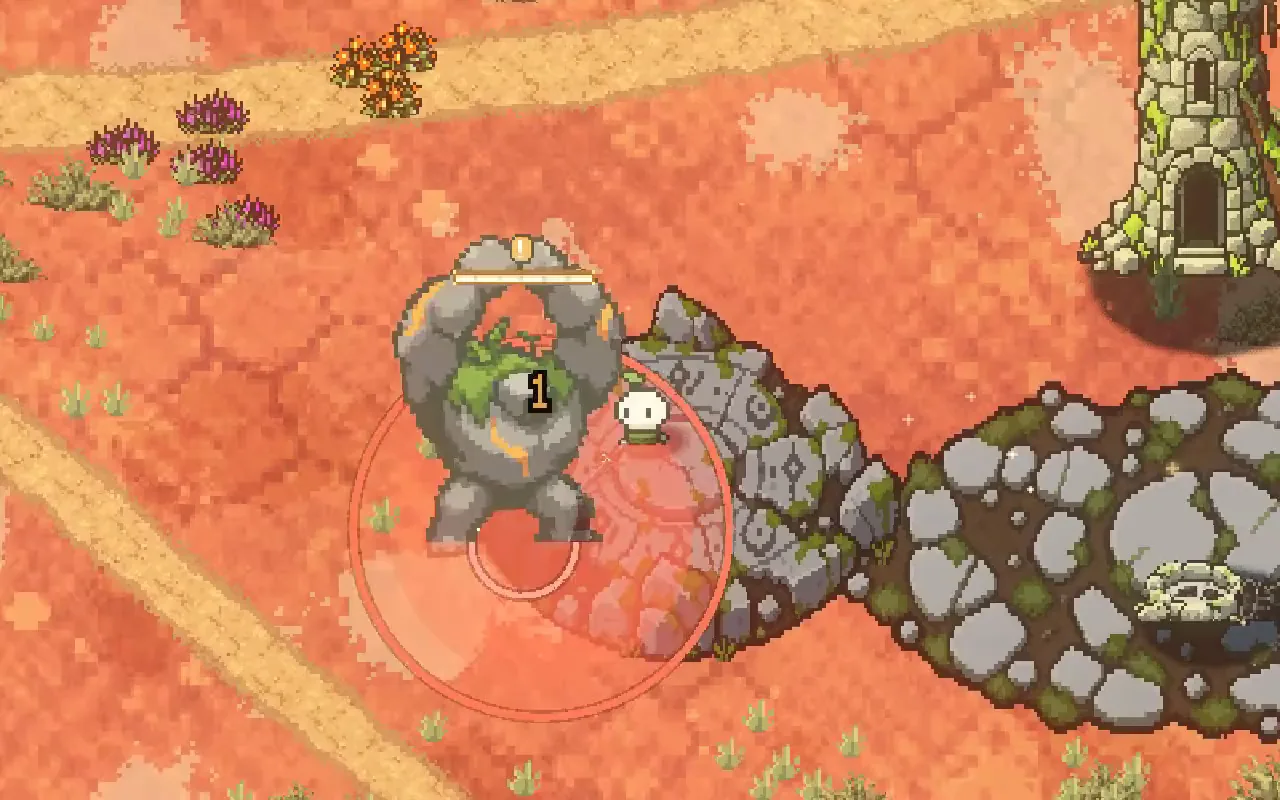
Every clip below is from the game, filmed for this post.
What makes an enemy feel heavy?
An enemy feels heavy when hitting it pushes you more than it pushes the enemy. A heavy enemy keeps going through your blows, moves slowly and warns long before its big attacks, and it only gives way after you've done enough damage.
The short answer
How big enemies feel heavy in Mytheria:
- Every creature has a mass worked out from its size, and the biggest ones count as very heavy.
- Each blow is split between the two bodies, so when you hit something heavier, you bounce back and it barely moves.
- Heavier weapons carry more mass, so an anchor moves a colossus more than a sword does.
- Big creatures keep going through your hits.
- Enough damage in a short time staggers a big creature and leaves it open.
- Big creatures walk slowly, warn long before they strike and lean less when hit.
Give every creature a mass
In Mytheria, a creature's mass comes from its size: its radius divided by the player's, squared. A creature the player's size weighs 1. The Mossback, a bit wider, weighs 2.6, and the Hollowhorn about 5. The biggest creatures are marked steadfast, which means they count as at least 14 times the player, whatever their size. The Stoneback Colossus, the Rune Sentinel and the Antlered Duelist are all steadfast.
Split the blow between the two bodies
When you hit something, the push of the blow is shared between you and it, depending on how heavy each is. Hit something lighter than the blow and it takes the whole shove. Hit something heavier and it takes only part of it, and the rest comes back at you as a bounce. Try it with the game's own numbers:
Pick a weapon and a creature to see who moves
A sword hit on a Thornling throws it 21 pixels and you don't move at all. The same hit on the Stoneback Colossus moves it under 6 pixels and bounces you 9 pixels back.
Make heavy weapons carry more mass
Each weapon also has its own strike mass: a sword strikes as 3, the Lantern Censer as 6 and the Stormglass Anchor as 8. The heavier the weapon, the more of its shove the colossus takes and the less you bounce, so the heavy weapons feel heavy as well.
Drag the line to compare before and now
Don't let big creatures flinch
Small creatures flinch when you hit them hard enough, which interrupts what they were doing, but steadfast creatures never flinch. A colossus that stopped every time you poked it would stop being a threat, so ours keep walking and winding up their attacks while you hit them. Creatures in the middle of a charge or a leap don't flinch either, so a big committed attack always lands where it was warned.
Let the player earn the stagger
A heavy enemy that never gives way gets tiring to fight. So the heaviest creatures have poise, an amount of damage that breaks their stance if you deal it fast enough. The Stoneback Colossus has 90 poise. Deal 90 damage without a pause of more than four seconds between blows and it staggers: its attack is cancelled and it stands still for two and a half seconds.
While it's staggered it's also exposed. The Colossus normally takes only half damage from your blows, but while staggered it takes double, so that's the time to use your strongest attacks.
There's a second way to stagger a heavy creature: hit it in the last moment before an attack it can be countered in, the ones warned in blue. Our post on telegraphing attacks explains the colours.
Make big creatures slow and steady
The Colossus walks at 30 units a second, while the player walks at 175. Its ground quake warns for 3 full seconds, the longest of any attack in the game. Every creature leans away from a hit, but the lean is scaled by the creature's height, so a big one barely tilts; a boss that rocks like a small creature looks like it's made of paper.
Our post on how to make combat feel good covers the rest of the hit: the flash, the hitstop and the three-hit discharge that throws you and a big target apart.
How we built the weight in Godot
In our Godot code, the split is one small function that takes the push, the weapon's strike mass and the creature's mass. Every weapon and every creature goes through it, so bosses need no special cases. A creature's mass comes from its size unless its data says otherwise, so a new creature gets a sensible weight automatically.
The player's bounce-back moves them through the same collision as walking, so walls stop it, and in co-op the host decides it and the guest's prediction follows. A development arena lets us change masses and pushes live and switch each effect on and off, so we can feel a change in seconds.
A checklist for heavy enemies
- Give every creature a mass, and make the biggest ones very heavy.
- Split each blow between the two bodies, so the player bounces off heavy things.
- Give heavy weapons more strike mass.
- Don't let the biggest creatures flinch.
- Let enough damage stagger them, and make them take extra damage while staggered.
- Make big creatures slow, give their attacks long warnings and keep their lean small.
Further reading
- How to make combat feel goodHow we made combat feel good in our indie game Mytheria: hitstop, hit flash, knockback and screen shake, with real frame data you can try yourself.
- Telegraphing attacks: how to warn players before a hitA telegraphed attack warns you where and when it will land. How Mytheria telegraphs every attack: a shape on the ground, a clock, more time for big hits.
- MytheriaThe game this colossus lives in: a pixel-art co-op adventure for one to four players.
Wishlist Mytheria
Mytheria is a pixel-art co-op adventure for one to four players, coming to Steam for Windows, macOS and Steam Deck. A wishlist is the best way to follow it and to help us.