Damage numbers in games: why whole numbers read better
How Mytheria draws floating damage numbers: whole numbers, one number that ticks up per target, colours by who's hurt, and lanes so hits never overlap.
On this page
Damage numbers seem simple: a number pops up when you hit something. In a fast fight with several enemies, though, they can turn into a blizzard of digits that nobody reads. In Mytheria, our pixel-art co-op game, damage numbers follow a few small rules so that a glance tells you how hard you're hitting, who got hurt, and how close something is to falling.
The clips below were filmed in the game for this post.
How should damage numbers work in a game?
Show whole numbers, big enough to read in a glance. Merge rapid hits on the same target into one number that ticks up, so a combo reads as a total. Colour numbers by who was hurt, so your damage and the damage you take never look alike. Keep numbers from different targets apart so they don't overlap, and make a finishing blow stand out.
The short answer
How Mytheria's damage numbers work:
- Damage is always a whole number, and every hit deals at least 1.
- Hits by the same attacker on one target within 0.6 seconds tick one number up.
- The colour shows who was hurt: cream on trees and rocks, gold on creatures, red on you.
- A finishing blow or a hit of 25 or more is one size larger.
- Numbers for different targets take the nearest free spot, so they never touch.
- A pixel font with a dark edge keeps them readable over grass, sand and snow.
- Each number pops, rises and is gone in 0.6 seconds.
Use whole numbers
If a tool does 0.35 damage to a rock, the screen shows 0.35 flickering past, which is hard to read, impossible to add up, and looks like a bug. So Mytheria keeps damage and health whole, at a scale where small hits are still round numbers: a starter axe or sword deals 10, a creature's blow deals 10, and every hit that lands deals at least 1. Scaling everything by ten keeps the number of hits a fight takes the same while the numbers read cleanly.
One number per target
A three-hit combo should read as one big hit, and three separate numbers make it read as three small ones. In Mytheria, every hit by the same player on the same creature within 0.6 seconds updates one number instead of adding another. The number pops each time it grows, so you still feel every hit, and what's left is the total. This is a combo on a hollowhorn, which has 100 health, at half speed:
The number on the last blow is one size larger, because it finished the creature. Hits of 25 or more get the same treatment, so a heavy weapon's big blow stands out from a quick tick. How we balance those weapons is in how to balance weapons with a damage budget.
Try the rules yourself, drawn with the game's own pixel digits. Swing a few times, then turn the rules off one by one:
Swing a few times, then switch the rules off one by one
Colour tells you who got hurt
The colour tells you what happened before you read the digits. Cream on trees, rocks and ores is a neutral tick of progress. Gold on creatures is damage you deal, and red is damage you take, the one to notice.
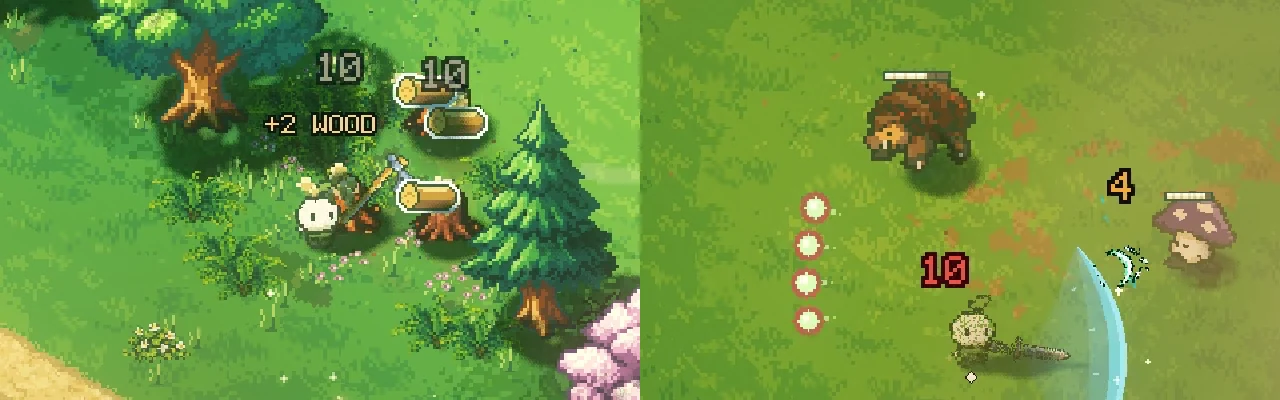
In co-op, a partner's damage on a creature shows in their player colour instead of gold, so you can tell your hits from theirs. When a partner is hurt, their red number starts above their name tag rather than on top of it. Every player's screen shows every hit, guests' included.
Keep numbers apart
A wide swing can hit three creatures standing close together, and their numbers would land on top of each other. So each new number takes the nearest free spot from a fixed set of 13 around its target: straight above first, then up, left, right, below and further out. Numbers for different targets never touch, even at the peak of their pop.
Numbers also share the air with pickup lines like "+4 STONE"; how a rock break keeps them apart is in how to make a rock break feel satisfying.
Make them crisp and short
The numbers use a tiny pixel font, 5 by 7 pixels per digit, with a one-pixel dark edge around every digit, which keeps them readable over bright grass, pale sand or snow without a box behind them. Each number lives for 0.6 seconds: it pops up 35 % larger, settles, rises and is gone. With reduced motion turned on, numbers don't rise. Because they disappear so quickly, the screen only holds what just happened, which keeps a busy fight readable. The rest of what makes a hit feel good is in how to make combat feel good.
Use it in your own game
These numbers are free to use: Damage Numbers, a Godot 4 add-on with the merging, the colours, the 13 spots and the pixel font from this post. It's MIT licensed, so you can drop it into any project.
A checklist for damage numbers
- Use whole numbers, and make every hit at least 1.
- Merge rapid hits on one target into one rising number.
- Colour by who was hurt.
- Make finishing and heavy blows one size larger.
- Keep numbers for different targets apart.
- Use a crisp font with a dark edge.
- Keep each number on screen for well under a second.
- In co-op, show everyone's hits on every screen.
Further reading
- How to make combat feel goodHow we made combat feel good in our indie game Mytheria: hitstop, hit flash, knockback and screen shake, with real frame data you can try yourself.
- How to balance weapons with a damage budgetHow we balance Mytheria's nine weapons: a damage budget per tier, every move costed in seconds of budget, with all 108 combinations measured in play.
- MytheriaWatch the numbers climb yourself: a pixel-art co-op adventure for one to four players.
Wishlist Mytheria
Mytheria is a pixel-art co-op adventure for one to four players, coming to Steam for Windows, macOS and Steam Deck. A wishlist is the best way to follow it and to help us.